Commit part of your work
Click Changes in the toolbar. The badge counts the changed files; here there are three.
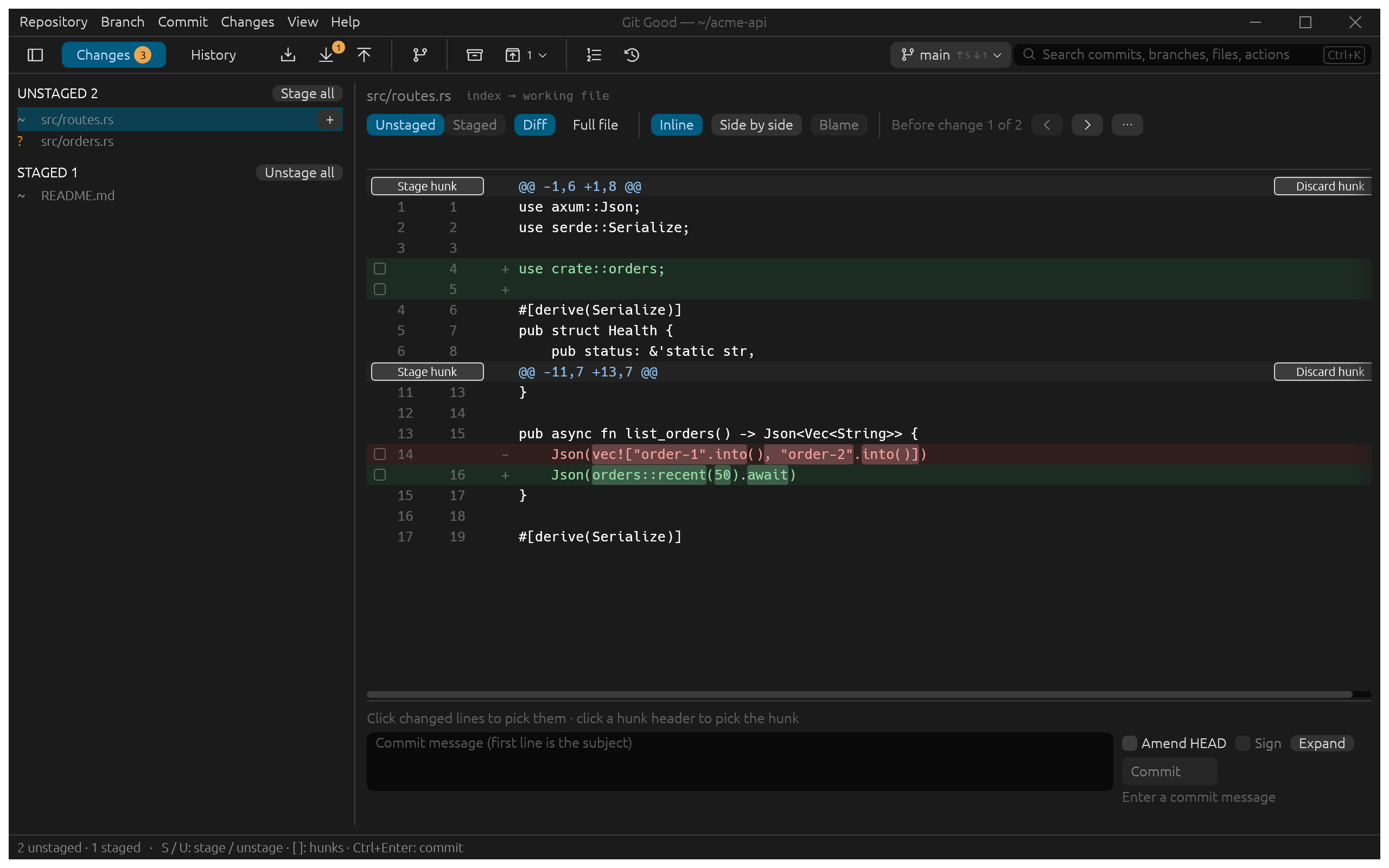
The lists
- Unstaged holds changes to tracked files (
~) and new, untracked files (?). - Staged holds what the next commit will contain.
- Stage all and Unstage all move everything; the + on a row stages that file.
Stage only what belongs together
In the example, src/routes.rs has two hunks: a new use crate::orders; import and the change that makes list_orders call it. Both belong to the same commit, but you could commit them separately:
- Click Stage hunk on a hunk header to stage that hunk.
- Or tick the boxes on single changed lines and press Stage N lines below the diff.
- With a file list focused, S and U stage and unstage the selected file; [ and ] move between hunks.
Discard hunk throws a hunk's working changes away after asking you to confirm.
Commit
Write the message in the box under the diff (the first line is the subject) and press Ctrl+Enter or Commit.
- Amend HEAD replaces the last commit instead. Git Good saves the old commit as a backup first.
- Sign signs the commit with your Git signing setup (GPG or SSH); its default follows
commit.gpgSign. - Expand gives the message more room.
Your draft message is kept if you switch views before committing.