Tag a release
Tags show as gold pills in the History tree, next to the branch pills. In acme-api, v0.1.0 marks Read the port from ACME_PORT and v0.2.0 marks Return 404 as JSON.
Create a tag
Select the commit to tag, then choose Branch › New tag… (or search for New tag). Git Good fills Target with the selected commit, or HEAD when nothing is selected.
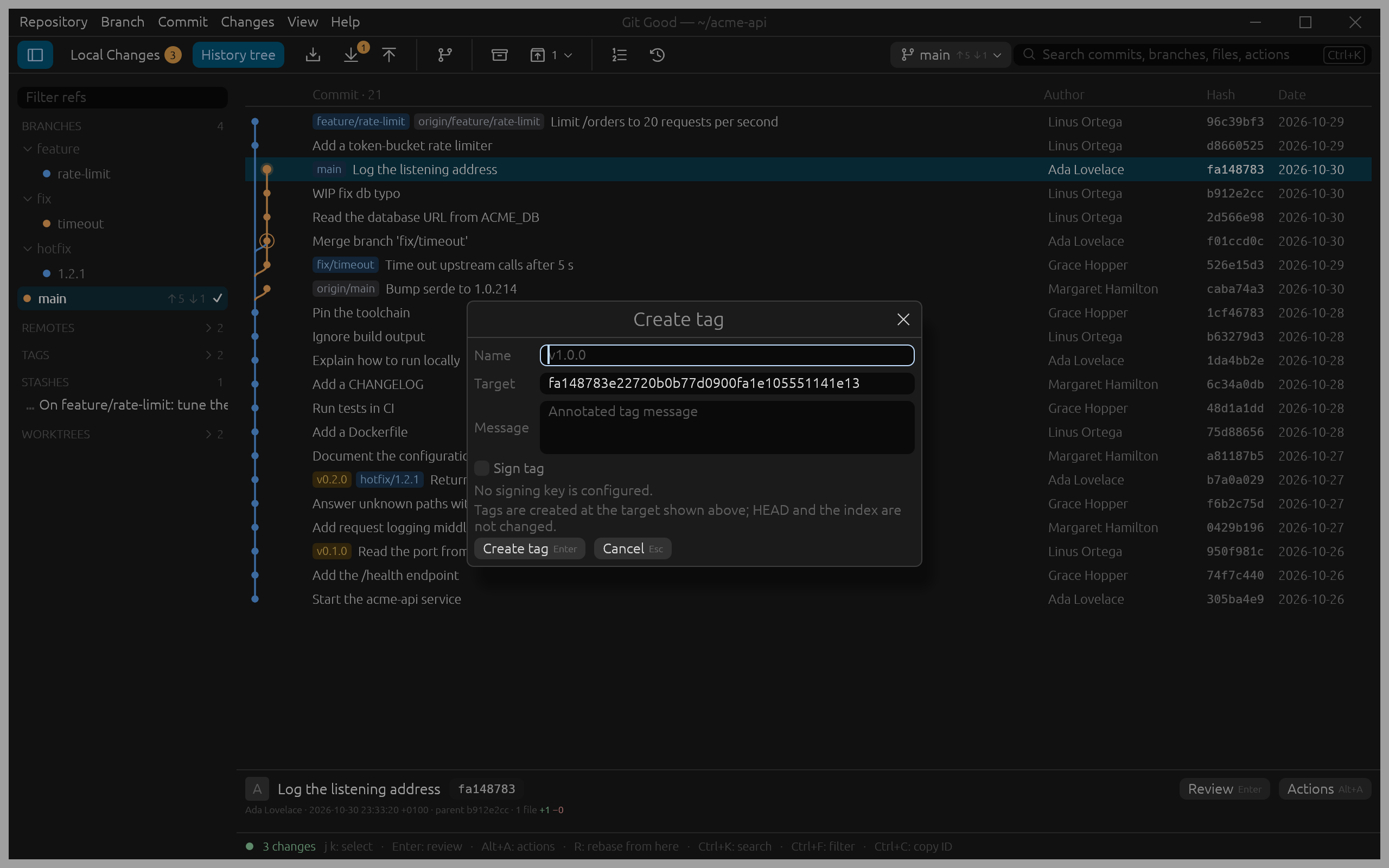
- Name and Message are both required: Git Good creates annotated tags, which record who tagged, when and why (
git tag -a). - Sign tag signs it with your Git signing key (
git tag -s). It starts fromtag.gpgsignand is disabled when no key is configured; see Sign commits and tags. - Creating a tag never moves
HEADor changes the index.
An existing name fails and keeps what you typed.
Delete a tag
Right-click the tag in the sidebar's Tags group, or its pill, and choose Delete tag…. Git Good asks Delete local tag v0.1.0? before deleting it. Only your local tag is deleted; a copy already pushed to a remote stays there.
Push tags
Push sends your branch, not its tags. To publish a tag, run git push origin v1.0.0 (or git push --tags for all of them) in a terminal.