Clean up with interactive rebase
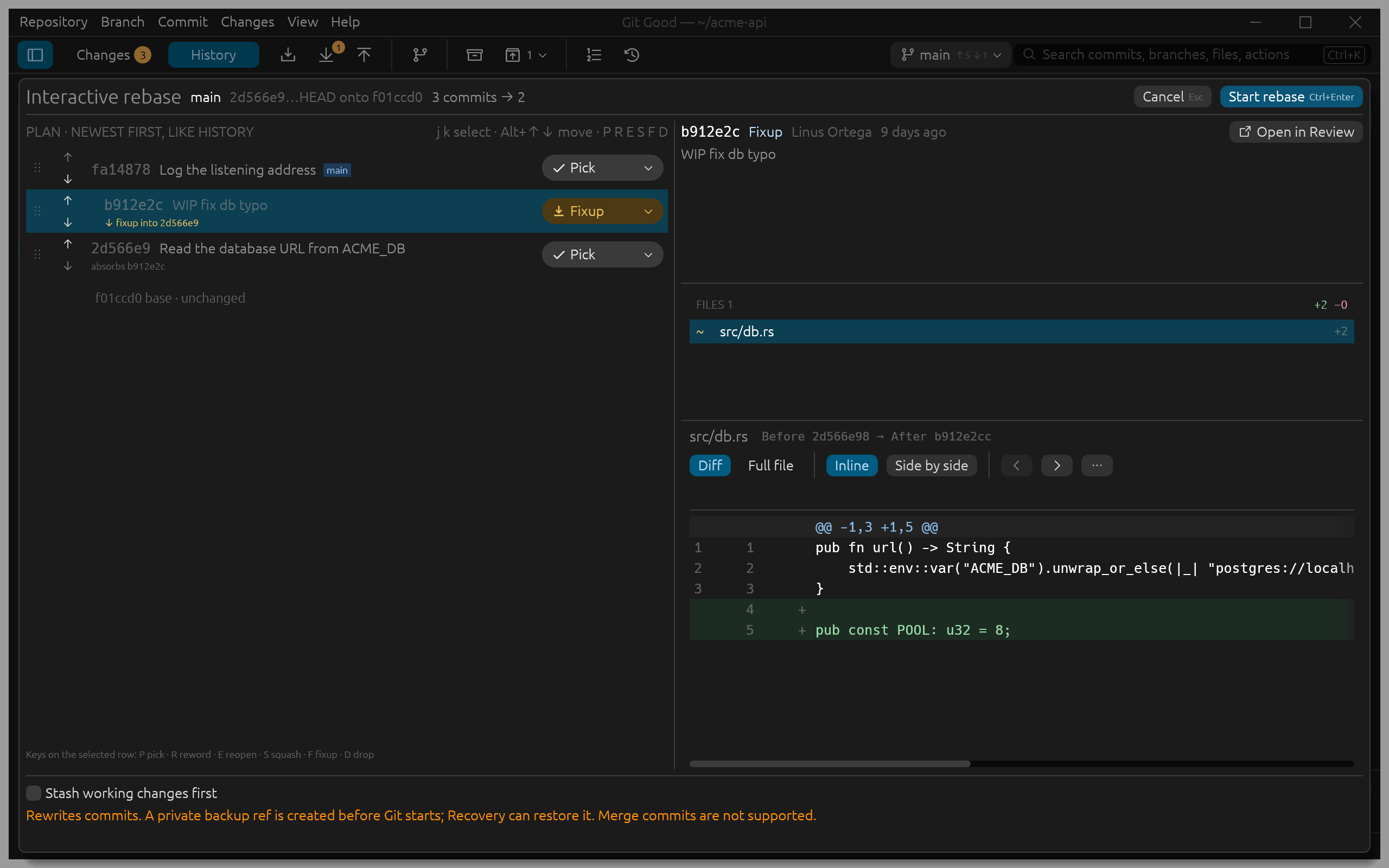
Before pushing, Linus wants to fold WIP fix db typo into the commit it fixes. Select the oldest commit to change, Read the database URL from ACME_DB, and press R (Interactive rebase from here… in the Commit menu). Branch › Interactive rebase of current branch… opens it for the commits your branch has that its upstream does not (or, when everything is pushed, that the default branch does not).
Build the plan
The plan lists the commits newest first, like History. For each one choose an action from its menu, or press its key:
| Key | Action | Result |
|---|---|---|
| P | Pick | Keep the commit as it is |
| R | Reword | Keep the changes, edit the message in place |
| E | Reopen | Stop after this commit so you can change or split it in Local Changes |
| S | Squash | Combine into the commit below and keep both messages |
| F | Fixup | Combine into the commit below and keep that commit's message |
| D | Drop | Remove the commit |
Alt+Up and Alt+Down (or dragging the handle) move a commit. Badges say what each choice does: fixup into 2d566e9 on the WIP commit, absorbs b912e2c on its target. The header counts the result: 3 commits → 2.
The right side shows the selected commit's files and diff, so you can check what you are folding before you start. Open in Review reads it in full and brings you back to the same plan.
Start
- Stash working changes first lets the rebase run with uncommitted work, and restores it afterwards.
- The notice says what happens to your old commits: a private backup ref is created before Git starts, and Recovery can restore it.
- Press Start rebase (Ctrl+Enter).
The band at the top shows each step while Git works. When it is done, the footer reads, for example, Rewrote 3 commits · backup refs/gg/backup/rewrite/…/main, with a Push button when only unpublished commits changed (Undo otherwise) and the details.
If a step stops (a Reopen, or a conflict), the band offers Continue, Skip commit and Abort and restore. On a conflict, Resolve conflicts in the band opens the conflict view.
Linear ranges only
Interactive rebase works on a range without merge commits. Choose a starting commit after the last merge.